
How to Migrate from Better Stack to openstatus
Mar 27, 2026 | by openstatus | [alternative]
Openstatus provides a built-in importer that migrates your Better Stack monitors, status page, components, incidents, and maintenances in a single operation. The entire process takes under two minutes.
This guide covers what gets imported, how Better Stack fields map to openstatus, and the steps to run the import from the openstatus dashboard.
For the announcement and background on why openstatus built cross-provider import, see the blog post.
What gets imported
The Better Stack importer reads from the Better Stack Uptime API (v3) and maps resources to their openstatus equivalents. Below is a breakdown of every resource type, the fields that carry over, and known caveats.
Monitors
Better Stack is the only provider where openstatus imports monitors directly. The importer supports HTTP, TCP, DNS, UDP, ICMP, SMTP, POP, and IMAP monitor types.
| Better Stack field | openstatus field | Notes |
|---|---|---|
url | url | Copied as-is |
pronounceable_name | name | Display name for the monitor |
monitor_type | jobType | Mapped: status, keyword, expected_status_code, ping, ping_icmp, smtp, pop, imap all become http; tcp stays tcp; udp stays udp; dns stays dns |
http_method | method | Uppercased (e.g., get becomes GET) |
request_headers | headers | Array of {name, value} converted to {key, value} JSON |
request_body | body | Copied as-is |
request_timeout | timeout | Converted from seconds to milliseconds |
check_frequency | periodicity | Snapped to nearest supported value (see below) |
regions | regions | Mapped to openstatus probe locations (see below) |
status | active | paused maps to inactive; all others map to active |
Region mapping
| Better Stack region | openstatus region | Location |
|---|---|---|
us | iad | Virginia, US |
eu | fra | Frankfurt, DE |
as | sin | Singapore |
au | syd | Sydney, AU |
If no regions match, the importer defaults to iad.
Frequency mapping
Better Stack allows arbitrary check intervals in seconds. Openstatus supports a fixed set. The importer snaps each interval to the nearest supported value:
| Better Stack interval | openstatus periodicity |
|---|---|
| 30s | 30s |
| 60s, 120s, 180s | 1m |
| 300s | 5m |
| 600s | 10m |
| 1800s | 30m |
| 3600s | 1h |
Intervals that fall between supported values are rounded to the nearest option.
Status page
The importer reads your Better Stack status pages and imports the first one it finds. If you have multiple status pages, pass a specific statusPageId to target the one you want.
| Better Stack field | openstatus field |
|---|---|
company_name | title |
subdomain | slug |
custom_domain | customDomain |
Component groups
Component groups are assembled from two sources:
- Status page sections -- sections defined on your Better Stack status page become component groups in openstatus.
- Monitor groups -- monitor groups from the Better Stack Uptime API are also imported as component groups.
Both types are deduplicated on subsequent imports.
Components
Status page resources become openstatus components. Each component is assigned one of two types:
| Resource type | openstatus type | Behavior |
|---|---|---|
| Monitor-backed resource | monitor | Linked to the imported openstatus monitor. Status updates automatically from monitoring data. |
| Non-monitor resource | static | Manual status management. No linked monitor. |
Components preserve their public_name, explanation (mapped to description), position (mapped to order), and section assignment (mapped to component group).
Incidents
Incidents are sourced differently depending on whether a status page is present:
- With a status page: the importer reads status page reports where
report_typeis notmaintenance. Each report and its status updates are converted into an openstatus status report with individual update entries. - Without a status page: the importer falls back to the Better Stack incidents API (
/v3/incidents). Synthetic status report updates are created from the incident timestamps (started_atbecomes "investigating",acknowledged_atbecomes "identified",resolved_atbecomes "resolved").
Incidents and their updates are always created as new entries. Re-running the import will produce duplicates.
Maintenances
Status page reports with report_type set to maintenance are imported as openstatus maintenances. The starts_at and ends_at fields map to the maintenance window, and all status report update messages are concatenated into the maintenance message.
Maintenances are always created as new entries. Re-running the import will produce duplicates.
Subscribers
Better Stack does not expose subscribers via their API. Subscriber import is not available. After completing the import, you will need to re-invite subscribers manually from the openstatus dashboard.
Step-by-step walkthrough
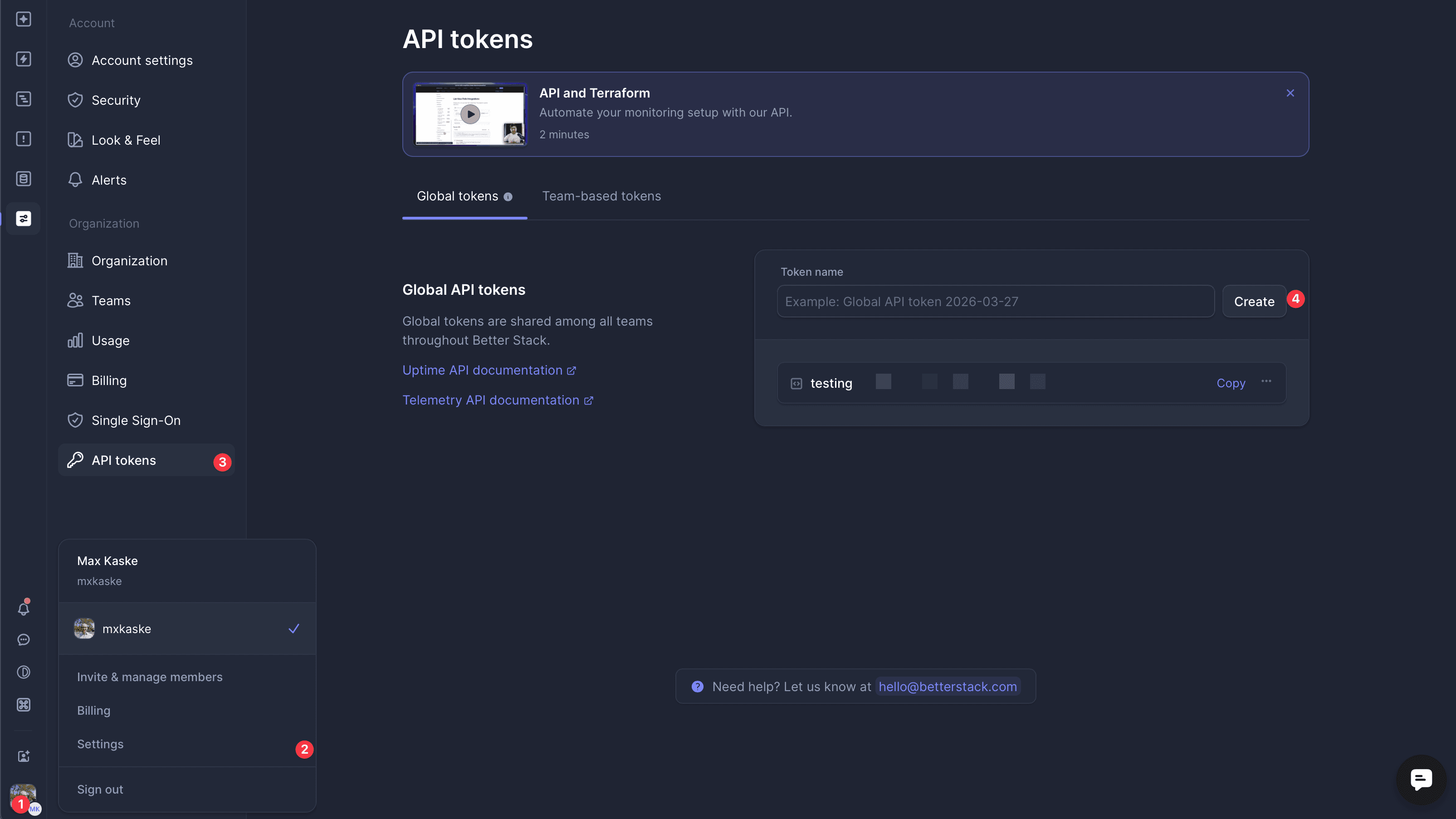
Step 1: Get your Better Stack API token
Log into Better Stack and navigate to Settings > API tokens. Copy your Uptime API token. This is the team-scoped token, not the global API token.
Step 2: Open the importer and preview
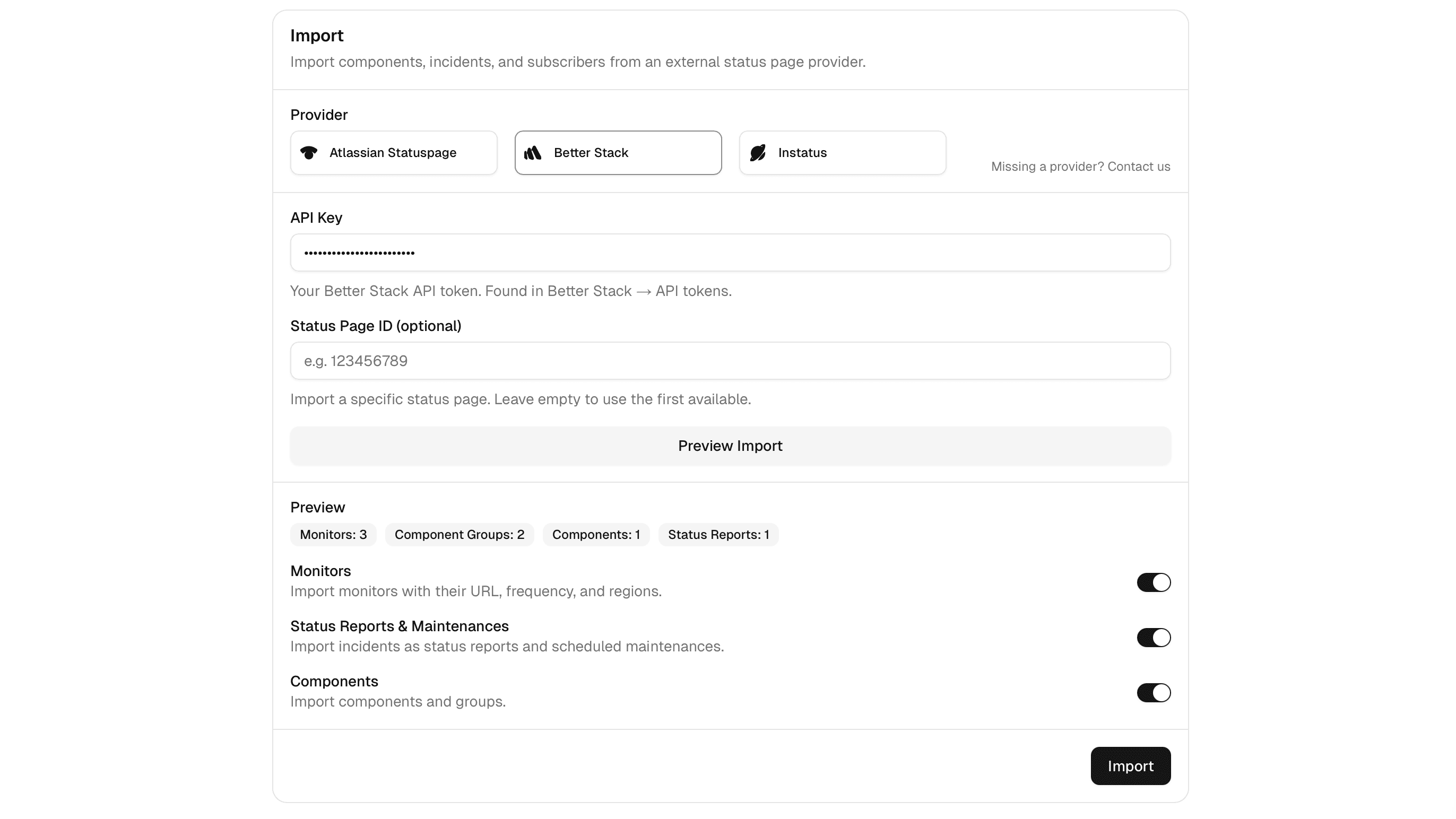
In the openstatus dashboard, go to Status Pages and select a status page (or create one first). Open the Components tab and scroll down to the Import section. Select Better Stack as the provider.
Paste your Better Stack API token into the token field. If you have multiple Better Stack status pages, enter the status page ID to target a specific one. Otherwise, the importer will use the first status page it finds.
Click Preview. The importer validates your token and fetches a summary of all resources that will be imported. The preview displays counts for monitors, components, component groups, incidents, and maintenances. Toggle individual resource types on or off as needed.
Click Import to start the migration. The import typically completes in under a minute.
After the import
Once the import finishes, there are a few things to verify:
- Monitor regions and frequency. Check that the mapped regions and periodicities match your expectations. Adjust any that were snapped to a different value than intended.
- Component-monitor links. Verify that monitor-backed components are correctly linked to their corresponding openstatus monitors. The importer resolves links by matching Better Stack resource IDs to imported monitor IDs.
- Component groups. Confirm that components are organized under the correct groups, especially if your Better Stack setup used both status page sections and monitor groups.
- Incidents and maintenances. Review a sample of imported incidents to ensure status update timelines look correct.
- DNS and custom domain. If your Better Stack status page used a custom domain, update your DNS records to point to openstatus. See the docs guide for instructions on configuring custom domains.
- Subscribers. Re-invite your subscribers from the openstatus dashboard. Better Stack does not expose subscriber data via their API, so this step must be done manually.
Video walkthrough
Watch a full migration from Better Stack to openstatus in real time.
Further reading
- Import from Statuspage, Better Stack, and Instatus -- blog announcement covering all three supported providers.
- How to Import a Status Page -- docs guide with detailed instructions and screenshots.
- Top Five Atlassian Statuspage Alternatives -- comparison of status page providers including Better Stack and openstatus.
Frequently asked questions
Can I import my Better Stack monitors into openstatus?
Yes. openstatus is the only provider that imports monitors from Better Stack — including URL, check frequency, HTTP method, headers, and regions.
Does openstatus import Better Stack subscribers?
No. Better Stack doesn't expose subscribers via their API, so subscriber import is not available. You'll need to re-invite subscribers manually.
What if I don't have a Better Stack status page?
You can still import. Without a status page ID, the importer will import your monitors, monitor groups, and incidents from the Better Stack Uptime API.
How are Better Stack regions mapped to openstatus?
Better Stack regions are mapped to the nearest openstatus probe location: US → iad (Virginia), EU → fra (Frankfurt), AS → sin (Singapore), AU → syd (Sydney).
How are check frequencies mapped?
Better Stack intervals are snapped to the nearest supported openstatus frequency: 30s, 1m, 5m, 10m, 30m, or 1h.
Can I run the import multiple times?
Monitors, components, and component groups are deduplicated — the importer checks for existing resources before creating new ones. However, incidents and maintenances are always created as new entries, so re-running will produce duplicates for those.